
Controls and Movement
You can interact with the man wearing the green overalls just outside the tower entrance to open up the “Tutorial” section that explains how to navigate through Iutycyr Tower. This tutorial is filled with useful information for Last Mission, but understandably, most people don’t want to read pages and pages of an ‘in-game’ instruction manual, so they just jump in.
Unfortunately, those players have access to important controls they might not even know about, so it’s worth spending a bit of time on some “basic controls” that often get overlooked.
Important Controls
Here is a list of the most important controls that sometimes get overlooked:
| Control | Description |
|---|---|
   and and    | Used for rotating your character to make sure you’re facing the enemy before initiating an attack. Your character will automatically face an enemy if they’re hit by an attack, but these two buttons help you target ranged attacks and prepare for an approaching enemy. Players typically pick up these controls pretty quickly after jumping into the tower, but don’t spend time on the first floors trying to get by without them. |
   | Rotates the camera around the player. This is one of the most effective ways to navigate your character, as it lets you avoid moving diagonally and messing up your movements. This is explored more in-depth in the Advanced Tips and Tricks page of the guide. |
   + +    | Ending your turn without taking action; this button combination makes enemies move around while you stand still. Learning to use this functionality is critical so you can force enemies to walk toward you and ensure you always get the first attack in. Once again, check out the Advanced Tips and Tricks page for more information. |
A screenshot of the controls page is included below, and it’s worth reviewing:
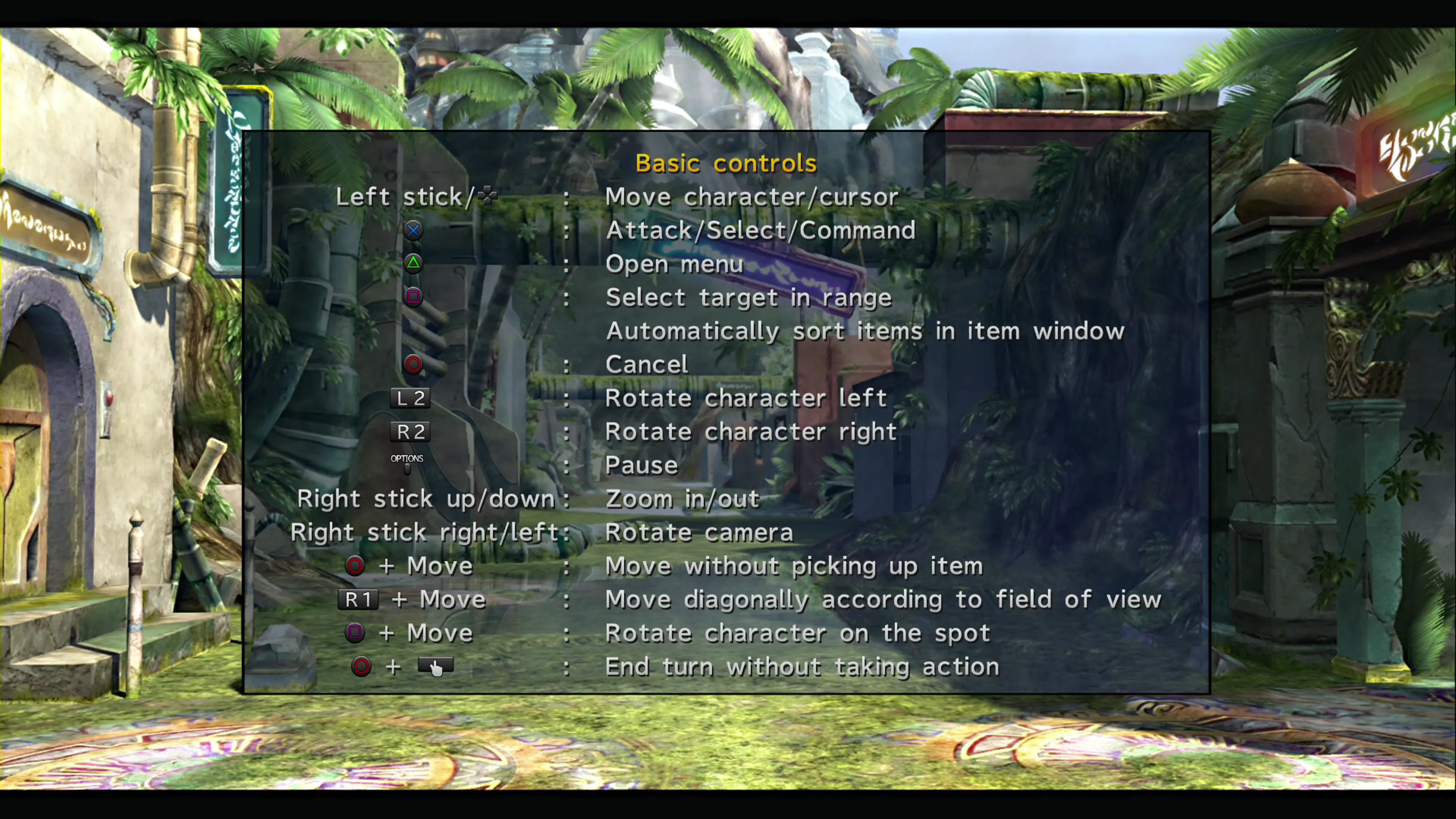
As you start navigating your way through the tower, many of these controls will become huge quality-of-life improvements: being able to pass over items without grabbing them to keep your inventory unclogged, using 

 to automatically target enemies… the list goes on. Spend some time studying and come back to this image after you clear the first section of floors to make sure you haven’t missed anything.